

Table of Contents
The Problem: Sprint Planning That Feels Like Guesswork
Before suggesting my 7 Sprint Planning Templates I’m about to share in the next paragraphs, I want to ask you a question. Have you ever come out of a sprint planning meeting feeling more confused than before? If you answered yes, you are in good company. 🙋
Agile teams may face organizational and planning challenges that make it harder to build their capabilities as they scale their practices. According to the 17th State of Agile Report by Digital.ai, the primary sources of challenges experienced by 788 software development professionals who participated in the study were organizational, such as resistance to change, inadequate leadership comprehension, and internal silos. The hindrances that Agile teams encounter while scaling can also manifest themselves at a lower level, for instance, during the planning processes due to changing priorities, interdependencies, or stakeholders’ concerns.
In my personal experience, leading planning meetings for software development teams rarely fails because of a lack of planning knowledge. It fails because of inadequate information. When the backlog is unavailable, capacities are unknown, and dependencies are unplanned, the team ends up wasting planning time searching for information that should have been available to them earlier.
Here’s what that friction actually looks like week to week:
- 📋 The Product Backlog is not sufficiently refined before planning: acceptance criteria are unclear, dependencies have not been identified, or important details still need discussion
- 🤷 Capacity is estimated with little or with no basis at all.
- 🔀 Scope gets negotiated during the meeting, leaving little or no time for actual estimation.
- 🚧 Dependencies not identified until the middle of the sprint, e.g., “We were blocked and couldn’t say anything till day 8 of the sprint”
None of these is a good utilization of the team’s limited planning time. On the other hand, I am well aware that there is no such thing as perfect sprint planning. The only important thing is whether your team has enough information at hand to make a reasonable plan based on that information. The templates below should help you eliminate some of the recurring pitfalls that make the planning meeting unnecessarily difficult.
How This Gets Fixed: 7 Templates That Solve One Failure Point Each
Regular backlog grooming before the meeting starts is the foundation everything else is built on. From there, these 7 templates close the gaps:
1. 📝 The Definition of Ready Checklist
Before sprint planning, teams can use the Definition of Ready checklist to make sure that there is certain information that an item should possess to be able to accept and discuss something. The criteria should be agreed upon by the team rather than treated as a universal Scrum requirement.
Teams that neglect this step waste the first 20 minutes of their planning meeting explaining tickets instead of estimating them.
2. 🧮 The Capacity Calculator
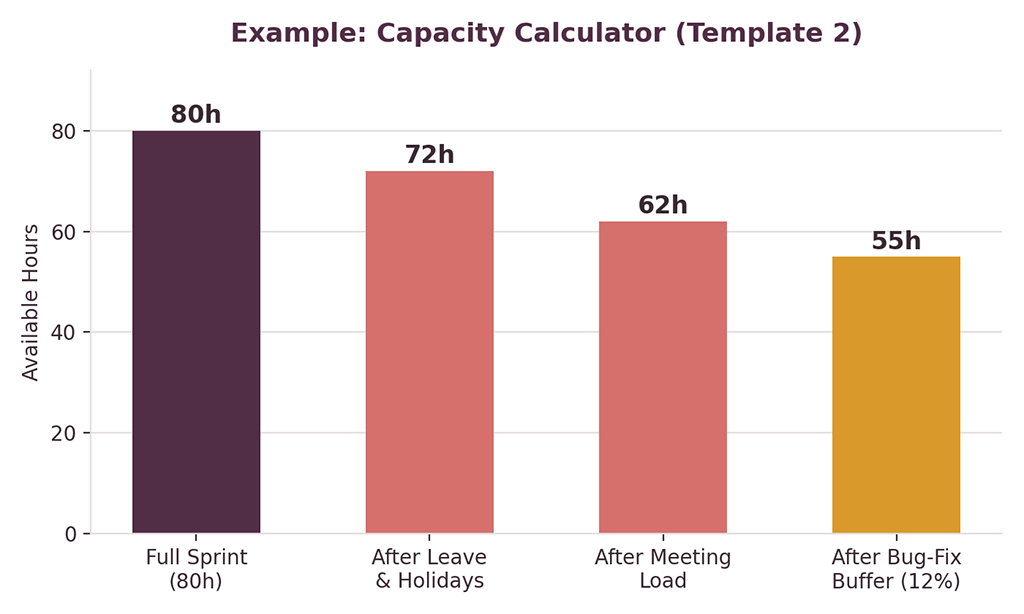
The team’s theoretical hours are not the same as the usable Sprint capacity. Vacations, meetings, support work, and a reasonable allowance for unplanned work can erode the available time for performing Sprint work.
In this example, the team is reducing their capacity with the planned leave, regular meetings, and an allowance for unplanned work. The percentage is going to be different for every team, so the important thing is to calculate the available capacity and not just assume that the theoretical hours are 100% available:
3. 🎯 The Sprint Goal One-Liner
A Sprint Goal should be formulated in such a way that it conveys the purpose or value of the Sprint. If the team cannot clearly explain the Sprint Goal, perhaps it is best to revisit whether the selected work constitutes a meaningful Sprint. A good goal should sound something like “Ship working checkout for mobile users”. If your team can’t say that in a hallway test, that’s not really a goal yet.
4. 🔗 The Dependency Tracker
Sometimes when web and app teams are working in multiple areas, the interdependencies are not obvious until you wait for someone else’s work or component. I like to keep a simple tracker of what is required, who owns it, what it depends on, and when it is needed
The idea is not to have another project-management-heavy document, but just to make sure that these important handoff points happen early enough for the people receiving them to discuss before they turn into Sprint blockers.
5. 📖 The Agile Ceremony Cheat Sheet
Every standup, review, and retro has a purpose. When that gets overlooked, those meetings can quickly turn into busywork instead of productive discussions.
The official Scrum Guide is always a good source to consult when the need arises to remember what the Scrum events are actually intended for. The current guide points to the Sprint Planning, Daily Scrum, Sprint Review, and Sprint Retrospective as events which have defined purpose and are not just regular meetings.
6. 🚩 The Red Flags Checklist
Some warning signs are insurmountable, like substantial scope changes that come up during the Sprint or test cases that have been delayed until the final days. Others are more subtle, such as items deferred because they have been blocked for a few days or a dependent item that has no clear owner. The goal of this checklist is to identify those warning signs so that the team can respond to them in time.
Whatever their source, catching any of these early saves you heartache on day 9 of a 10-day sprint.
7. 📣 The Stakeholder Weekly Update
A successful Sprint, if the team fails to properly communicate changes, may leave stakeholders puzzled about what has actually been done. To me, a brief update for stakeholders about the project’s progress is always an important part of my own project reporting since it links the delivery work of the team to the business view: completed, in progress, at risk, and next steps.

Where Most Teams Are Coming From
I added a quick self-check to this article for a reason – most teams don’t have issues in all seven areas. Usually, it’s 2-3 recurring problems they have. Here’s how it might look on the actual (example) scoresheet:
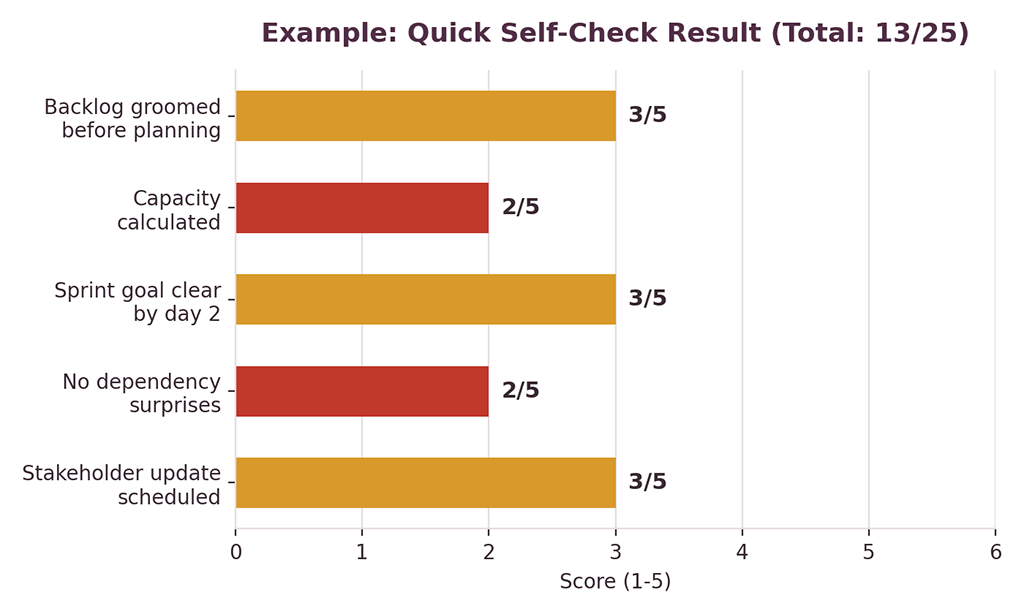
Here, capacity planning and dependency tracking are the weak areas, with everything else being at least somewhat competent. This is useful information because it shows us where we really need to focus our efforts to improve.
This gives you a more valuable starting point: instead of trying to improve everything, you can zero in on the planning areas where your team is having the most friction and begin there.
Quick Self-Check 🎯
Rate your last ones on each of the following 1-5:
- Backlog was groomed before planning had started
- Capacity was calculated and not guessed
- Team could voice the sprint goal by day 2
- No big dependency surprises mid-sprint
- Stakeholders had a clear, scheduled update
If your score indicates multiple areas of weakness, consider using this as a starting point for discussion rather than an absolute indicator of where you are in terms of Sprint Planning maturity. Pick one or two areas that seem most pressing and use the appropriate template to try a new approach.
Why This Set of Templates, Specifically
There are already a lot of Sprint Planning templates on the web. I prepared this set based on a slightly different approach: instead of a general plan, we try to identify the most common failure reason and address it with some necessary but minimal tooling.
A few things that make this set stand out:
| Generic Sprint Advice | This 7-Template System | |
|---|---|---|
| Capacity planning | “Estimate carefully” | An actual formula: full capacity minus leave, meetings, and buffer |
| Sprint goals | “Have a clear goal” | A one-liner test you can literally check in a hallway conversation |
| Dependencies | Mentioned as a risk | A dedicated tracker with clear ownership |
| Format | Long-form advice articles | Editable, reusable templates you duplicate sprint after sprint |
Get the Free Cheat Sheet
If you need a quick reference guide for the 7 planning areas covered in this article, be sure to use the cheat sheet as your companion to the templates. It is meant to help you identify which planning problem you are facing before choosing the appropriate template.
Get the Full Toolkit
The 7 templates above are available as fully editable, copy-paste-able Excel spreadsheets in the PM Toolkit for Web & App Teams – they’re meant to be used and reused for every sprint, not PDFs you recreate every two weeks.
Related articles:
- 9 Slides Every Weekly PM Status Report Needs to Impress Founders
- 7 Key Differences: How the Scrum Master Differs from the Project Manager
Frequently Asked Questions (FAQ)
How long should our sprint planning sessions be?
The Scrum Guide limits the number of hours for Sprint Planning for the one-month Sprint to eight. In addition, it states that shorter Sprints require shorter planning sessions. However, there is no fixed number of hours that can be applied to all teams. Instead, the time should be defined by the length of the Sprint, the required complexity of the work, the team’s experience, and the state of the Product Backlog.
How does the Scrum Master’s role differ from a Project Manager’s role during Sprint Planning?
In Scrum, the Scrum Master is accountable for the establishment of the Scrum framework and the team’s understanding and application of it. The Developers are responsible for figuring out how to transform the selected Product Backlog items into an Increment, while the Product Owner is bringing the context of the Product Goal and Product Backlog into the planning conversation. The Project Manager in a wider delivery environment may have additional duties related to schedule, dependencies, risks, resources, and stakeholders. It depends on the particularities of the organizational setup of the delivery mechanism.
I discuss this further in this article.
Are these templates useful to agile teams that use a different iterative framework (Kanban, hybrid, etc.)?
The three most valuable templates (capacity, dependencies, and stakeholder updates) apply to any iterative planning process. The Dependency Tracker is most valuable to Kanban teams because they plan in a continuous flow rather than in two-week sprints.
If our team only has capacity to adopt one of these seven, which should we prioritize?
Begin with the template that addresses the biggest problem in your team’s planning process.
If you’re consistently overestimating capacity, start with the Capacity Calculator.
If your team is constantly surprised by dependencies, start with the Dependency Tracker. And if your stakeholders are confused by your progress reports, start with the Stakeholder Weekly Update.
The point is to address the most pressing issue – not to assume that one template will be a good fit for all teams.
Can we use any of these if we’re not the Scrum Master or PM?
Absolutely. Several of these (particularly the Dependency Tracker) can be used by any team member, even if they don’t have the authority of a process owner. Anybody can introduce some discipline with a simple checklist if they’re presented with it correctly.
Resources
Your Turn 💬
Which of these 7 is your team missing right now? Drop a comment below; I read every one.